Click on the image to view in full screen.
MasonHax Cheat External for COD Black Ops 6
Reviews:
OS:
10, 11
Built-in spoofer:
No
Last detection:
Never
Game client:
Steam Only
Proccessor:
Intel, AMD
USB Required:
No
Window mode:
Windowed Fullscreen
$ 3.99
/1day
$ 15
/7days
$ 39.99
/30days
Features
Reviews
FAQ
MasonHax Cheat Features & Description
MasonHax is a cutting edge undetected cheat for Call of Duty: Black Ops 6, designed for players who value control, accuracy, and discretion. Equipped with advanced security bypass technology, MasonHax ensures smooth, stable performance while staying completely hidden from anti-cheat systems. Whether you're looking to dominate quietly or push your gameplay to the next level, MasonHax gives you the competitive edge without compromise.
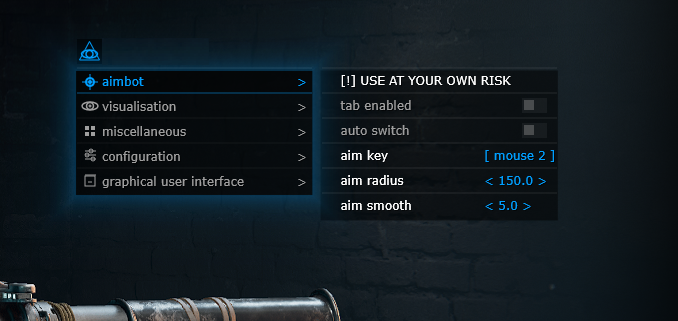
AIMBOT (Risky)
- Aim smooth / Set the aimbot's aim smoothness
- Auto switch / Select body part to aimbot at
- Aim key / Set aimbot activation key
- Tab enable / Enable aimbot
- Aim radius / Set the aimbot's radius
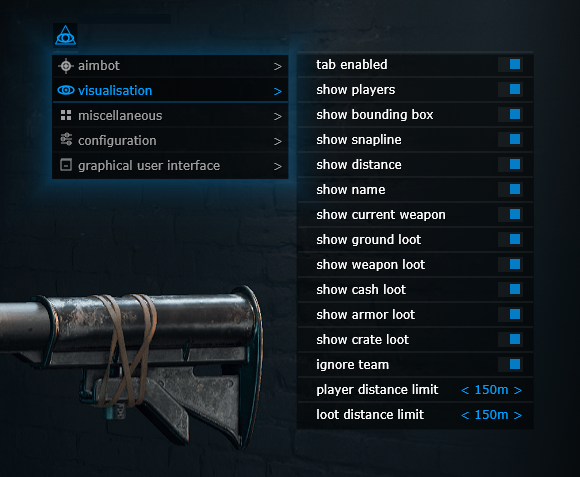
VISUALISATION
- Ignore team / Esp will ignore its own team
- Show name / Show names
- Player distance limit / Set the display distance of players
- Show current weapon / Show current weapon
- Tab enable / Enable visual features
- Show players / Show players
- Show distance / Show distance
- Show snapline / Show lines
- Show bounding box / Show 2D squares
- Show crate loot / Show crates
- Show armor loot / Show armor
- Show weapon loot / Show weapon
- Loot distance limit / Set the display distance of items
- Show cash loot / Show money
- Show ground loot / Show loot on the ground
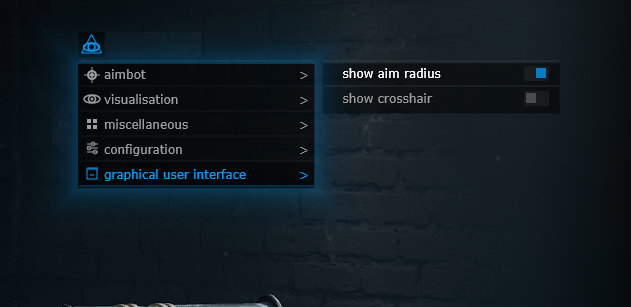
GRAPHICAL USER INTERFACE
- Show aim radius / Display aimbot radius
- Show crosshair / Display crosshair in the center of the monitor
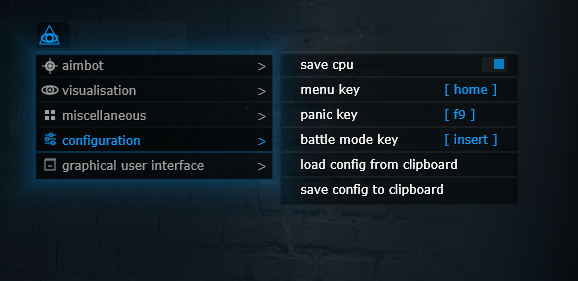
CONFIGURATION
- Battle mode key / Set the battle mode activation key, disables all unnecessary functions
- Save cpu / Save used resources, allows you to reduce the load, use this function on weak computers
- Load config from clipboard / Save user settings
- Save config to clipboard / Load custom settings
- Panic key / Set the emergency key to disable all cheats in the game
- Menu key / Set the menu call key, by default the "HOME" key is used