Click on the image to view in full screen.
Hexwing Cheat External for Overwatch
Reviews:
OS:
10, 11
Built-in spoofer:
No
Last detection:
Never
Game client:
Steam, Battlenet
Proccessor:
Intel, AMD
USB Required:
No
Window mode:
All
$ 9.99
/1day
$ 49.99
/7days
$ 99.99
/30days
Features
Reviews
FAQ
Hexwing Cheat Features & Description
Hexwing is a powerful and undetected Overwatch 2 cheat designed for players who want to gain a competitive edge without compromising safety. With features like a highly accurate aimbot, advanced ESP to track enemies through walls, and customizable settings for legit or rage playstyles, Hexwing offers everything you need to dominate matches. Built with strong anti-cheat bypass techniques, Hexwing ensures smooth performance and stealth operation, making it one of the most reliable Overwatch 2 hacks available. Whether you're climbing ranks or just having fun, Hexwing helps you stay ahead in every fight.
AIMBOT
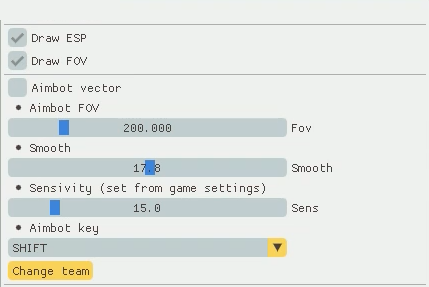
- Aimbot FOV / Set the radius of the aimbot operation
- Aimbot vector / Enable vector aimbot
- Change team
- Smooth / Set the aimbot's smoothness
- Sensitivity (set from game settings) / Set the aimbot sensitivity, with additional settings in the game
- Aimbot key / Set a key for the aimbot to work, the aimbot works only when you hold down the selected key, there is no free aimbot key, it is selected only from the list provided
ESP
- Change team / Change the display command, additionally set the "X" key for convenience
- Draw FOV / Display the aimbot's working radius
- Draw ESP / Display 2D squares on opponents
- Head Circle / Circle at the position of the player's head
- 3D Box ESP / Draws a 3D box
- Center Dot / Point in the center of the player's box
- Foot Circle / Circle at the position of the player's feet
- Snap Lines / Lines from the bottom of the screen to the player
- Skeleton ESP
- 2D Box ESP / Draws a 2D box
- Direction Arrow / Arrow showing the direction of the player's gaze
- Visibility Dot-a circle showing the player's visibility
- Box Border Style / Different Border styles (Solid / Rounded)
- Box Outline Thickness / Setting the thickness of the box lines
- Filled Box Background / Semi-transparent background inside the box
- Corner Indicators / 4 markers at the corners of the box for better border visualization
- Team Color Indicator / Different colors for enemies and allies
- Distance-based Alpha / Transparency of ESP elements depends on the distance to the target
- Distance-based Size Scaling / Automatically resizing ESP elements based on distance
- Distance Filter Slider / Setting the maximum distance for displaying goals
- 2D Box ESP
- 3D Box ESP
- Skeleton ESP / Skeleton
- Direction Arrow / Arrow indicating the direction of the player's gaze
- Visibility Dot / Dot is a circle showing the player's visibility
- Head Circle / Circle at the position of the player's head
- Foot Circle / Circle at the player's foot position
- Center Dot / The point in the center of the player's box
- Team Color Indicator / Different colors for enemies and allies
- Distance-based Alpha / Transparency of ESP elements depends on the distance to the target
- Distance Filter Slider / Setting the maximum target display distance
- Snap Lines / Lines from the bottom of the screen to the player
- Distance-based Size Scaling / Automatic resizing of ESP elements depending on the distance
- Corner Indicators / 4 markers at the corners of the box for better visualization of borders
- Box Outline Thickness / Setting the thickness of the box lines
- Box Border Style / Different border styles (Solid / Rounded)
- Filled Box Background / Semi-transparent background inside the box